Video SEO

  • Subscribe to our RSS feed.
  • Twitter
  • StumbleUpon
  • Reddit
  • Facebook
  • Digg

Monday, 5 March 2007

Using the robots meta tag

Posted on 16:05 by Unknown
Recently, Danny Sullivan brought up good questions about how search engines handle meta tags. Here are some answers about how we handle these tags at Google.

Multiple content values
We recommend that you place all content values in one meta tag. This keeps the meta tags easy to read and reduces the chance for conflicts. For instance:

<META NAME="ROBOTS" CONTENT="NOINDEX, NOFOLLOW">

If the page contains multiple meta tags of the same type, we will aggregate the content values. For instance, we will interpret

<META NAME="ROBOTS" CONTENT="NOINDEX">
<META NAME="ROBOTS" CONTENT="NOFOLLOW">

The same way as:

<META NAME="ROBOTS" CONTENT="NOINDEX, NOFOLLOW">

If content values conflict, we will use the most restrictive. So, if the page has these meta tags:

<META NAME="ROBOTS" CONTENT="NOINDEX">
<META NAME="ROBOTS" CONTENT="INDEX">

We will obey the NOINDEX value.

Unnecessary content values
By default, Googlebot will index a page and follow links to it. So there's no need to tag pages with content values of INDEX or FOLLOW.

Directing a robots meta tag specifically at Googlebot
To provide instruction for all search engines, set the meta name to "ROBOTS". To provide instruction for only Googlebot, set the meta name to "GOOGLEBOT". If you want to provide different instructions for different search engines (for instance, if you want one search engine to index a page, but not another), it's best to use a specific meta tag for each search engine rather than use a generic robots meta tag combined with a specific one. You can find a list of bots at robotstxt.org.

Casing and spacing
Googlebot understands any combination of lowercase and uppercase. So each of these meta tags is interpreted in exactly the same way:

<meta name="ROBOTS" content="NOODP">
<meta name="robots" content="noodp">
<meta name="Robots" content="NoOdp">

If you have multiple content values, you must place a comma between them, but it doesn't matter if you also include spaces. So the following meta tags are interpreted the same way:

<META NAME="ROBOTS" CONTENT="NOINDEX, NOFOLLOW">
<META NAME="ROBOTS" CONTENT="NOINDEX,NOFOLLOW">

If you use both a robots.txt file and robots meta tags
If the robots.txt and meta tag instructions for a page conflict, Googlebot follows the most restrictive. More specifically:
  • If you block a page with robots.txt, Googlebot will never crawl the page and will never read any meta tags on the page.
  • If you allow a page with robots.txt but block it from being indexed using a meta tag, Googlebot will access the page, read the meta tag, and subsequently not index it.
Valid meta robots content values
Googlebot interprets the following robots meta tag values:
  • NOINDEX - prevents the page from being included in the index.
  • NOFOLLOW - prevents Googlebot from following any links on the page. (Note that this is different from the link-level NOFOLLOW attribute, which prevents Googlebot from following an individual link.)
  • NOARCHIVE - prevents a cached copy of this page from being available in the search results.
  • NOSNIPPET - prevents a description from appearing below the page in the search results, as well as prevents caching of the page.
  • NOODP - blocks the Open Directory Project description of the page from being used in the description that appears below the page in the search results.
  • NONE - equivalent to "NOINDEX, NOFOLLOW".
A word about content value "NONE"
As defined by robotstxt.org, the following direction means NOINDEX, NOFOLLOW.

<META NAME="ROBOTS" CONTENT="NONE">

However, some webmasters use this tag to indicate no robots restrictions and inadvertently block all search engines from their content.

Update: For more information, please see our robots meta tag documentation.
Read More
Posted in crawling and indexing | No comments

Friday, 2 March 2007

Using the site: command

Posted on 13:49 by Unknown
The site: command enables you to search through a particular site. For instance, a searcher could look for references to [Buffy] in this blog by doing the following search:

site:googlewebmastercentral.blogspot.com buffy

Webmasters sometimes use this command to see a list of indexed pages for a site, like this:

site:www.google.com

Note that with this command, there's no space between the colon and the URL. A search for www.site.com returns URLs that begin with www and a search for site.com returns URLs for all subdomains. (So, site:google.com returns URLs such as www.google.com, checkout.google.com, and finance.google.com). You can do this search from Google or you can go to your webmaster tools account and use the link under Statistics > Index stats. Note that whether this link includes the www depends on how you have added the site to your account.

Historically, Google has avoided showing pages that appear to be duplicate (e.g., pages with the same title and description) in search results. Our goal is to provide useful results to the searcher. However, with a site: command, searchers are likely looking for a full list of results from that site, so we are making a change to do that. In some cases, a site: search doesn't show a full list of results even when the pages are different, and we are resolving that issue as well. Note that this is a display issue only and doesn't in any way affect search rankings. If you see this behavior, simply click the "repeat the search with omitted results included" link to see the full list. The pages that initially don't display continue to show up for regular queries. The display issue affects only a site: search with no associated query. In addition, this display issue is unrelated to supplemental results. Any pages in supplemental results display "Supplemental Result" beside the URL.

Because this change to show all results for site: queries doesn't affect search rankings at all, it will probably happen in the normal course of events as we merge this change into the next time that we push a new executable for handling the site: command. As a result, it may be several weeks or so before you start to see this change, but we'll keep monitoring it to make sure the change goes out.
Read More
Posted in general tips, search results | No comments

Tuesday, 27 February 2007

Traveling Down Under: GWC at Search Engine Room and Search Summit Australia

Posted on 15:53 by Unknown
G'day Webmasters! Google Webmaster Central is excited to be heading to Sydney for Search Summit and Search Engine Room on March 1-2 and 20-21, respectively.

In addition to our coverage of topics in bot obedience and site architecture, we'll also provide a clinic for building Sitemaps, and chances to "chew the fat" with the Aussies in the "Google Breakfast" and "Google Webmaster Central Q&A." Our Search Evangelist, Adam Lasnik, will lead a fun session in "Living the Non 9-5 Life, Tips for Achieving Balance, Sanity...", where mostly, we hope to learn from you.

Search Summit

Thursday, March 1st
Site Architecture, CSS and Tableless Design 14:45 - 15:30
Peeyush Ranjan, Engineering Manager

Friday, March 2nd
Bot Obedience 09:45 - 10:00
Dan Crow, Product Manager, Crawl Systems

Web 2.0 & Search 11:15 - 12:00
Dan Crow, Product Manager, Crawl Systems

Google Linking Clinic 12:00 - 12:45
Adam Lasnik, Search Evangelist

Lunch with Google Webmaster Central 12:45 -13:30

Sitemap Clinic 13:30 - 14:15
Maile Ohye, Developer Support Engineer

Google Webmaster Central Q&A 14:15 - 15:00

Living the Non 9-5 Life, Tips for Achieving Balance, Sanity... 15:00 - 15:45
Adam Lasnik, Search Evangelist

Search Engine Room

Tuesday, March 20th
Google Breakfast 07:30 - 09:00
Aaron D'Souza, Software Engineer, Search Quality

Don't Be Evil 09:30 - 10:30
Richard Kimber, Managing Director of Sales and Operations
Read More
Posted in events | No comments

Monday, 26 February 2007

Better badware notifications for webmasters

Posted on 12:33 by Unknown
In the fight against badware, protecting Google users by showing warnings before they visit dangerous sites is only a small piece of the puzzle. It's even more important to help webmasters protect their own users, and we've been working on this with StopBadware.org. A few months ago we took the first step and integrated malware notifications into webmaster tools. I'm pleased to announce that we are now including more detailed information in these notifications, and are also sending them to webmasters via email.

Webmaster tools notifications
Now instead of simply informing webmasters that their sites have been flagged and suggesting next steps, we're also showing example URLs that we've determined to be dangerous. This can be helpful when the malicious content is hard to find. For example, a common occurrence with compromised sites is the insertion of a 1-pixel iframe causing the automatic download of badware from another site. By providing example URLs, webmasters are one step closer to diagnosing the problem and ultimately re-securing their sites.

Email notifications
In addition to notifying webmaster tools users, we've also begun sending email notifications to some of the webmasters of sites that we flag for badware. We don't have a perfect process for determining a webmaster's email address, so for now we're sending the notifications to likely webmaster aliases for the domain in question (e.g., webmaster@, admin@, etc). We considered using whois records, but these often contain contact information for the hosting provider or registrar, and you can guess what might happen if a web host learned that one of its client sites was distributing badware. We're planning to allow webmasters to provide a preferred email address for notifications through webmaster tools, so look for this change in the future.

Update: For more information, please see our Help Center article on malware and hacked sites.
Read More
Posted in feedback and communication, webmaster tools | No comments

Tuesday, 20 February 2007

Tips on using feeds and information on subscriber counts in Reader

Posted on 12:18 by Unknown
Does your site have a feed? A feed can connect you to your readers and keep them returning to your content. Most blogs have feeds, but increasingly, other types of sites with frequently changing content are making feeds available as well. Some examples of sites that offer feeds:
  • News sources such as the New York Times publish feeds of their latest stories
  • Companies like Apple publish feeds of their press releases, as well as a few other feeds.
  • Blogs including the Official Google Blog publish feeds with their latest posts
  • Shopping sites like Buy.com publish feeds with noteworthy deals
Find out how many readers are subscribed to your feed
If your site has a feed, you can now get information about the number of Google Reader and Google Personalized Homepage subscribers. If you use Feedburner, you'll start to see numbers from these subscriptions taken into account. You can also find this number in the crawling data in your logs. We crawl feeds with the user-agent Feedfetcher-Google, so simply look for this user-agent in your logs to find the subscriber number. If multiple URLs point to the same feed, we may crawl each separately, so in this case, just count up the subscriber numbers listed for each unique feed-id. An example of what you might see in your logs is below:

User-Agent: Feedfetcher-Google; (+http://www.google.com/feedfetcher.html; 4 subscribers; feed-id=1794595805790851116)

Making your feed available to Google
You can submit your feed as a Sitemap in webmaster tools. This will let us know about the URLs listed in the feed so we can crawl and index them for web search. In addition, if you want to make sure your feed shows up in the list of available feeds for Google products, simply add a <link> tag with the feed URL to the <head> section of your page. For instance:

<link rel="alternate" type="application/atom+xml" title="Your Feed Title" href="http://www.example.com/atom.xml" />

Remember that Feedfetcher-Google retrieves feeds only for use in Google Reader and Personalized Homepage. For the content to appear in web search results, Googlebot will have to crawl it as well.

Don't yet have a feed?

If you use a content management system or blogging platform, feed functionality may be built right now. For instance, if you use Blogger, you can go to Settings > Site Feed and make sure that Publish Site Feed is set to Yes. You can also set the feed to either full or short and can add a footer. The URL listed here is what subscribers add to their feed readers. A link to this URL will appear on your blog.

More tips from the Google Reader team
In order to provide the best experience for your users, the Google Reader team has also put together some tips for feed publishers. This document covers feed best practices, common implementation pitfalls, and various ways to promote your feeds. Whether you're creating your feeds from scratch or have been publishing them for a long time, we encourage you to take a look at our tips to make the most of your feeds. If you have any questions, please get in touch.
Read More
Posted in products and services, sitemaps | No comments

Wednesday, 14 February 2007

Our Valentine's day gift: out of beta and adding comments

Posted on 01:48 by Unknown
Here at webmaster central, we love the webmaster community -- and today, Valentine's Day, we want to show you that our commitment to you is stronger than ever. We're taking webmaster tools out of beta and enabling comments on this blog.

Bye, bye beta
We've come a long way since our initial launch of the Sitemaps protocol in June 2005. Since then, we've expanded to a full set of webmaster tools, changed our name, listened to your input, and expanded even more. 2006 was a year of great progress, and we're just getting started. Coming out of beta means that we're committed to partnering with webmasters around the world to provide all the tools and information you need about your sites in our index. Together, we can provide the most relevant and useful search results. And more than a million of you, speaking at least 18 different languages, have joined in that partnership.

In addition to the many new features that we've provided, we've been making lots of improvements behind the scenes to ensure that webmaster tools are reliable, scalable, and secure.

The Sitemaps protocol has evolved into version 0.9, and Microsoft and Yahoo have joined us in that support to provide standards that make it easier for you to communicate with search engines. We're excited about how much information we've been able to learn about your sites and we plan to continue to develop the best ways for you to provide us with information about individual pages on your sites.

Hello, comments
Our goal is improved communication with webmasters, and while our blog, discussion forum, and tools help us reach that goal, you can now post comments and feedback directly on this blog as well. This helps you talk to us about topics we're posting. We want to do all we can to encourage an open dialogue between Google and the webmaster community; this is another avenue to do that.

As always, if you have questions or want to talk about things other than a particular blog post, head over to our discussion forum. You'll find our team there often, answering questions and gathering feedback. And if you haven't already, check out the "links to this post" link under every post to see other discussions of this blog across the web.

Thank you, webmasters, for joining us in this great collaboration. Happy Valentine's Day.
Read More
Posted in feedback and communication | No comments

Tuesday, 13 February 2007

Update on Public Service Search

Posted on 10:56 by Unknown
Public Service Search is a service that enables non-profit, university, and government web sites to provide search functionality to their visitors without serving ads. While we've stopped accepting new Public Service Search accounts, if you want to add the functionality of this service to your site, we encourage you to check out the Google Custom Search Engine. Note that if you already have a Public Service Search account, you'll be able to continue offering search results on your site.

A Custom Search Engine can provide you with free web search and site search with the option to specify and prioritize the sites that are included in your search results. You can also customize your search engine to match the look and feel of your site, and if your site is a non-profit, university, or government site, you can choose not to display ads on your results pages.

You have two opportunities to disable ads on your Custom Search Engine. You can select the "Do not show ads" option when you first create a Custom Search Engine, or you can follow the steps below to disable advertising on your existing Custom Search Engine:

1. Click the "My search engines" link on the left-hand side of the Overview page.
2. Click the "control panel" link next to the name of your search engine.
3. Under the "Preferences" section of the Control panel page, select the Advertising status option that reads "Do not show ads on results pages (for non-profits, universities, and government agencies only)."
4. Click the "Save Changes" button.

Remember that disabling ads is available only for non-profit, university, and government sites. If you have a site that doesn't fit into one of these categories, you can still provide search to your visitors using the Custom Search Engine capabilities.

For more information or help with Custom Search Engines, check out the FAQ or post a question to the discussion group.
Read More
Posted in products and services | No comments

Monday, 12 February 2007

Come see us at SES London and hear tips on successful site architecture

Posted on 16:22 by Unknown
If you're planning to be at Search Engine Strategies London February 13-15, stop by and say hi to one of the many Googlers who will be there. I'll be speaking on Wednesday at the Successful Site Architecture panel and thought I'd offer up some tips for building crawlable sites for those who can't attend.

Make sure visitors and search engines can access the content
  • Check the Crawl errors section of webmaster tools for any pages Googlebot couldn't access due to server or other errors. If Googlebot can't access the pages, they won't be indexed and visitors likely can't access them either.
  • Make sure your robots.txt file doesn't accidentally block search engines from content you want indexed. You can see a list of the files Googlebot was blocked from crawling in webmaster tools. You can also use our robots.txt analysis tool to make sure you're blocking and allowing the files you intend.
  • Check the Googlebot activity reports to see how long it takes to download a page of your site to make sure you don't have any network slowness issues.
  • If pages of your site require a login and you want the content from those pages indexed, ensure you include a substantial amount of indexable content on pages that aren't behind the login. For instance, you can put several content-rich paragraphs of an article outside the login area, with a login link that leads to the rest of the article.
  • How accessible is your site? How does it look in mobile browsers and screen readers? It's well worth testing your site under these conditions and ensuring that visitors can access the content of the site using any of these mechanisms.

Make sure your content is viewable

  • Check out your site in a text-only browser or view it in a browser with images and Javascript turned off. Can you still see all of the text and navigation?
  • Ensure the important text and navigation in your site is in HTML, not in images, and make sure all images have ALT text that describe them.
  • If you use Flash, use it only when needed. Particularly, don't put all of the text from your site in Flash. An ideal Flash-based site has pages with HTML text and Flash accents. If you use Flash for your home page, make sure that the navigation into the site is in HTML.

Be descriptive

  • Make sure each page has a unique title tag and meta description tag that aptly describe the page.
  • Make sure the important elements of your pages (for instance, your company name and the main topic of the page) are in HTML text.
  • Make sure the words that searchers will use to look for you are on the page.

Keep the site crawlable


  • If possible, avoid frames. Frame-based sites don't allow for unique URLs for each page, which makes indexing each page separately problematic.
  • Ensure the server returns a 404 status code for pages that aren't found. Some servers are configured to return a 200 status code, particularly with custom error messages and this can result in search engines spending time crawling and indexing non-existent pages rather than the valid pages of the site.
  • Avoid infinite crawls. For instance, if your site has an infinite calendar, add a nofollow attribute to links to dynamically-created future calendar pages. Each search engine may interpret the nofollow attribute differently, so check with the help documentation for each. Alternatively, you could use the nofollow meta tag to ensure that search engine spiders don't crawl any outgoing links on a page, or use robots.txt to prevent search engines from crawling URLs that can lead to infinite loops.
  • If your site uses session IDs or cookies, ensure those are not required for crawling.
  • If your site is dynamic, avoid using excessive parameters and use friendly URLs when you can. Some content management systems enable you to rewrite URLs to friendly versions.
See our tips for creating a Google-friendly site and webmaster guidelines for more information on designing your site for maximum crawlability and usability.

If you will be at SES London, I'd love for you to come by and hear more. And check out the other Googlers' sessions too:

Tuesday, February 13th

Auditing Paid Listings & Clickfraud Issues 10:45 - 12:00
Shuman Ghosemajumder, Business Product Manager for Trust & Safety

Wednesday, February 14th

A Keynote Conversation 9:00 - 9:45
Matt Cutts, Software Engineer

Successful Site Architecture 10:30 - 11:45
Vanessa Fox, Product Manager, Webmaster Central

Google University 12:45 - 1:45

Converting Visitors into Buyers 2:45 - 4:00
Brian Clifton, Head of Web Analytics, Google Europe

Search Advertising Forum 4:30 - 5:45
David Thacker, Senior Product Manager

Thursday, February 15th

Meet the Crawlers 9:00 - 10:15
Dan Crow, Product Manager

Web Analytics and Measuring Successful Overview 1:15 - 2:30
Brian Clifton, Head of Web Analytics, Google Europe

Search Advertising Clinic 1:15 - 2:30
Will Ashton, Retail Account Strategist

Site Clinic 3:00 - 4:15
Sandeepan Banerjee, Sr. Product Manager, Indexing

      Read More
      Posted in crawling and indexing, events | No comments

      Monday, 5 February 2007

      Discover your links

      Posted on 14:37 by Unknown
      Update on October 15, 2008: For more recent news on links, visit Links Week on our Webmaster Central Blog. We're discussing internal links, outbound links, and inbound links.

      You asked, and we listened: We've extended our support for querying links to your site to much beyond the link: operator you might have used in the past. Now you can use webmaster tools to view a much larger sample of links to pages on your site that we found on the web. Unlike the link: operator, this data is much more comprehensive and can be classified, filtered, and downloaded. All you need to do is verify site ownership to see this information.


      To make this data even more useful, we have divided the world of links into two types: external and internal. Let's understand what kind of links fall into which bucket.


      What are external links?
      External links to your site are the links that reside on pages that do not belong to your domain. For example, if you are viewing links for http://www.google.com/, all the links that do not originate from pages on any subdomain of google.com would appear as external links to your site.

      What are internal links?

      Internal links to your site are the links that reside on pages that belong to your domain. For example, if you are viewing links for http://www.google.com/, all the links that originate from pages on any subdomain of google.com, such as http://www.google.com/ or mobile.google.com, would appear as internal links to your site.

      Viewing links to a page on your site

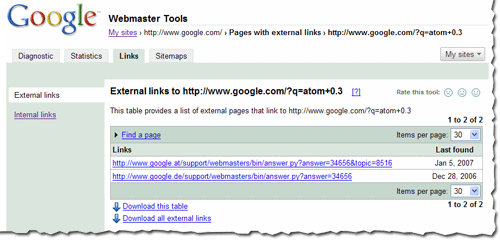
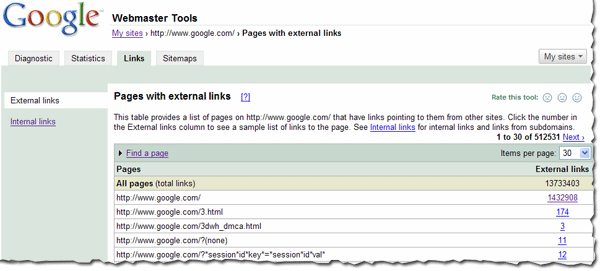
      You can view the links to your site by selecting a verified site in your webmaster tools account and clicking on the new Links tab at the top. Once there, you will see the two options on the left: external links and internal links, with the external links view selected. You will also see a table that lists pages on your site, as shown below. The first column of the table lists pages of your site with links to them, and the second column shows the number of the external links to that page that we have available to show you. (Note that this may not be 100% of the external links to this page.)


      This table also provides the total number of external links to your site that we have available to show you.
      When in this summary view, click the linked number and go to the detailed list of links to that page.
      When in the detailed view, you'll see the list of all the pages that link to specific page on your site, and the time we last crawled that link. Since you are on the External Links tab on the left, this list is the external pages that point to the page.


      Finding links to a specific page on your site
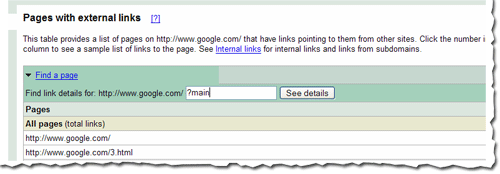
      To find links to a specific page on your site, you first need to find that specific page in the summary view. You can do this by navigating through the table, or if you want to find that page quickly, you can use the handy Find a page link at the top of the table. Just fill in the URL and click See details. For example, if the page you are looking for has the URL http://www.google.com/?main, you can enter “?main” in the Find a page form. This will take you directly to the detailed view of the links to http://www.google.com/?main.


      Viewing internal links

      To view internal links to pages on your site, click on the Internal Links tab on the left side bar in the view. This takes you to a summary table that, just like external links view, displays information about pages on your site with internal links to them.

      However, this view also provides you with a way to filter the data further: to see links from any of the subdomain on the domain, or links from just the specific subdomain you are currently viewing. For example, if you are currently viewing the internal links to http://www.google.com/, you can either see links from all the subdomains, such as links from http://mobile.google.com/ and http://www.google.com, or you can see links only from other pages on http://www.google.com.


      Downloading links data
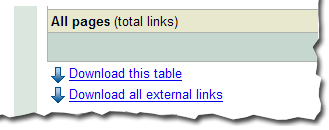
      There are three different ways to download links data about your site. The first: download the current view of the table you see, which lets you navigate to any summary or details table, and download the data in the current view. Second, and probably the most useful data, is the list all external links to your site. This allows you to download a list of all the links that point to your site, along with the information about the page they point to and the last time we crawled that link. Thirdly, we provide a similar download for all internal links to your site.


      We do limit the amount of data you can download for each type of link (for instance, you can currently download up to one million external links). Google knows about more links than the total we show, but the overall fraction of links we show is much, much larger than the link: command currently offers. Why not visit us at Webmaster Central and explore the links for your site?
      Read More
      Posted in crawling and indexing, webmaster tools | No comments

      Thursday, 25 January 2007

      A quick word about Googlebombs

      Posted on 16:16 by Unknown
      Co-written with Ryan Moulton and Kendra Carattini

      We wanted to give a quick update about "Googlebombs." By improving our analysis of the link structure of the web, Google has begun minimizing the impact of many Googlebombs. Now we will typically return commentary, discussions, and articles about the Googlebombs instead. The actual scale of this change is pretty small (there are under a hundred well-known Googlebombs), but if you'd like to get more details about this topic, read on.

      First off, let's back up and give some background. Unless you read all about search engines all day, you might wonder "What is a Googlebomb?" Technically, a "Googlebomb" (sometimes called a "linkbomb" since they're not specific to Google) refers to a prank where people attempt to cause someone else's site to rank for an obscure or meaningless query. Googlebombs very rarely happen for common queries, because the lack of any relevant results for that phrase is part of why a Googlebomb can work. One of the earliest Googlebombs was for the phrase "talentless hack," for example.

      People have asked about how we feel about Googlebombs, and we have talked about them in the past. Because these pranks are normally for phrases that are well off the beaten path, they haven't been a very high priority for us. But over time, we've seen more people assume that they are Google's opinion, or that Google has hand-coded the results for these Googlebombed queries. That's not true, and it seemed like it was worth trying to correct that misperception. So a few of us who work here got together and came up with an algorithm that minimizes the impact of many Googlebombs.

      The next natural question to ask is "Why doesn't Google just edit these search results by hand?" To answer that, you need to know a little bit about how Google works. When we're faced with a bad search result or a relevance problem, our first instinct is to look for an automatic way to solve the problem instead of trying to fix a particular search by hand. Algorithms are great because they scale well: computers can process lots of data very fast, and robust algorithms often work well in many different languages. That's what we did in this case, and the extra effort to find a good algorithm helps detect Googlebombs in many different languages. We wouldn't claim that this change handles every prank that someone has attempted. But if you are aware of other potential Googlebombs, we are happy to hear feedback in our Google Web Search Help Group.

      Again, the impact of this new algorithm is very limited in scope and impact, but we hope that the affected queries are more relevant for searchers.
      Read More
      Posted in search results | No comments

      Wednesday, 24 January 2007

      About badware warnings

      Posted on 16:53 by Unknown
      Some of you have asked about the warnings we show searchers when they click on search results leading to sites that distribute malicious software. As a webmaster, you may be concerned about the possibility of your site being flagged. We want to assure you that we take your concerns very seriously, and that we are very careful to avoid flagging sites incorrectly. It's our goal to avoid sending people to sites that would compromise their computers. These exploits often result in real people losing real money. Compromised bank accounts and stolen credit card numbers are just the tip of this identity theft iceberg.

      If your site has been flagged for badware, we let you know this in webmaster tools. Often, we find that webmasters aren't aware that their sites have been compromised, and this warning in search results is a surprise. Fixing a compromised site can be quite hard. Simply cleaning up the HTML files is seldom sufficient. If a rootkit has been installed, for instance, nothing short of wiping the machine and starting over may work. Even then, if the underlying security hole isn't also fixed, they may be compromised again within minutes.

      We are looking at ways to provide additional information to webmasters whose sites have been flagged, while balancing our need to keep malicious site owners from hiding from Google's badware protection. We aim to be responsive to any misidentified sites too. If your site has been flagged, you'll see information on the appeals process in webmaster tools. If you can't find anything malicious on your site and believe it was misidentified, go to http://stopbadware.org/home/review to request an evaluation. If you'd like to discuss this with us or have ideas for how we can better communicate with you about it, please post in our webmaster discussion forum.

      Update: this post has been updated to provide a link to the new form for requesting a review.


      Update: for more information, please see our Help Center article on malware and hacked sites.
      Read More
      Posted in webmaster tools | No comments

      Friday, 19 January 2007

      The Year in Review

      Posted on 09:16 by Unknown
      Welcome to 2007! The webmaster central team is very excited about our plans for this year, but we thought we'd take a moment to reflect on 2006. We had a great year building communication with you, the webmaster community, and creating tools based on your feedback. Many on the team were able to come out to conferences and met some of you in person, and we're looking forward to meeting many more of you in 2007. We've also had great conversations and gotten valuable feedback in our discussion forum, and we hope this blog has been helpful in providing information to you.

      We said goodbye to the Sitemaps blog and launched this broader blog in August. And after doing so, our number of unique monthly visitors more than doubled. Thanks! We got much of our non-Google traffic from other webmaster community blogs and forums, such as the Search Engine Watch blog, Google Blogoscoped, and WebmasterWorld. In December, seomoz.org and the new Searchengineland.com were our biggest non-Google referrers. And social networking sites such as digg.com, reddit,com, del.icio.us, and slashdot.org sent webmaster tools many of our visitors, and a blog by somebody named Matt Cutts sent a lot of referrers our way as well. And these are the top Google queries that visitors clicked on:


      Our most popular post was about the Googlebot activity reports and crawl rate control that we launched in October, followed by details about how to authenticate Googlebot. We have only slightly more Firefox users (46.28%) than Internet Explorer users (46.25%). 89% of you use Windows. After English, our readers most commonly speak French, German, Japanese, and Spanish. And after the United States, our readers primarily come from the UK, Canada, Germany, and France.

      Here's some of what we did last year.

      January
      We expanded into Swedish, Danish, Norwegian, and Finnish.
      You could hear Matt on webmaster radio.

      February
      We lauched several new features, including:
      • robots.txt analysis tool
      • page with the highest PageRank by month
      • common words in your site's content and in anchor text to your site
      We met many of you at the Google Sitemaps lunch at SES NY.
      You could hear me on webmaster radio.

      March
      We launched a few more features, including:
      • showing the top position of your site for your top queries
      • top mobile queries
      • download options for Sitemaps data, stats, and errors

      April
      We got a whole new look and added yet more features, such as:
      • meta tag verification
      • notification of violations to the webmaster guidelines
      • reinclusion request form and spam reporting form
      • indexing information (can we crawl your home page? is your site indexed?)
      We also added a comprehensive webmaster help center and expanded the webmaster guidelines from 10 languages to 18.
      We met more of you at the Google Sitemaps lunch at Boston Pubcon.
      Matt talked about the new caching proxy.
      We talked to many of you at SES Toronto.

      May
      Matt introduced you to our new search evangelist, Adam Lasnik.
      We hung out with some of you in our hometown at Search Engine Watch Live Seattle and over at SES London.

      June

      We launched user surveys, to learn more about how you interact with webmaster tools.
      We expanded some of our features, such as:
      • increased the number of crawl errors shown to 100% within the last two weeks
      • Increased the number of Sitemaps you can submit from 200 to 500
      • Expanded query stats so you can see them per property and per country and made them available for subdirectories
      • Increased the number of common words in your site and in links to your site from 20 to 75
      • Added Adsbot-Google to the robots.txt analysis tool
      Yahoo! Stores incorporated Sitemaps for their merchants.

      July
      We expanded into Polish.
      We began supporting the <meta name="robots" content="noodpt"> tag to allow you to opt out of using Open Directory titles and descriptions for your site in the search results.
      We had a great time talking to many of you about international issues at SES Latino in Miami.

      August
      August was an exciting month for us, as we launched webmaster central! As part of that, we renamed Google Sitemaps to webmaster tools, expanded our Google Group to include all types of webmaster topics, and expanded the help content in our webmaster help center. We also launched some new features, including:
      • Preferred domain control
      • Site verification management
      • Downloads of query stats for all subfolders
      In addition, I took over the GoodKarma podcast on webmasterradio for two shows (one all about Buffy the Vampire Slayer!) and we met even more of you at the Google Webmaster Central lunch at SES San Jose.

      September
      We improved reporting of the cache date in search results.
      We provided a way for you to authenticate Googlebot.
      And we started updating query stats more often and for a shorter timeframe.

      October
      We launched several new features, such as:
      • Crawl rate control
      • Googlebot activity reports
      • Opting in to enhanced image search
      • Display of the number of URLs submitted via a Sitemap
      And you could hear Matt being interviewed in a podcast.

      November
      We launched sitemaps.org, for joint support of the Sitemaps protocol between us, Yahoo!, and Microsoft.
      We also started notifying you if we flagged your site for badware and if you're an English news publisher included in Google News, we made News Sitemaps available to you.
      Partied with lots of you at "Safe Bets with Google" at Pubcon Las Vegas.
      We introduced you to our new Sitemaps support engineer, Maile Ohye, and our first webmaster trends analyst, Jonathan Simon.

      Dec
      We met even more of you at the webmaster central lunch at SES Chicago.

      Thanks for spending the year with us. We look forward to even more collaboration and communication in the coming year.
      Read More
      Posted in feedback and communication, webmaster tools | No comments

      Thursday, 21 December 2006

      Better understanding of your site

      Posted on 14:41 by Unknown
      SES Chicago was wonderful. Meeting so many of you made the trip absolutely perfect. It was as special as if (Chicago local) Oprah had joined us!

      While hanging out at the Google booth, I was often asked about how to take advantage of our webmaster tools. For example, here's one tip on Common Words.

      Common Words: Our prioritized listing of your site's content
      The common words feature lists in order of priority (from highest to lowest) the prevalent words we've found in your site, and in links to your site. (This information isn't available for subdirectories or subdomains.) Here are the steps to leveraging common words:

      1. Determine your website's key concepts. If it offers getaways to a cattle ranch in Wyoming, the key concepts may be "cattle ranch," "horseback riding," and "Wyoming."

      2. Verify that Google detected the same phrases you believe are of high importance. Login to webmaster tools, select your verified site, and choose Page analysis from the Statistics tab. Here, under "Common words in your site's content," we list the phrases detected from your site's content in order of prevalence. Do the common words lack any concepts you believe are important? Are they listing phrases that have little direct relevance to your site?

      2a. If you're missing important phrases, you should first review your content. Do you have solid, textual information that explains and relates to the key concepts of your site? If in the cattle-ranch example, "horseback riding" was absent from common words, you may then want to review the "activities" page of the site. Does it include mostly images, or only list a schedule of riding lessons, rather than conceptually relevant information?

      It may sound obvious, but if you want to rank for a certain set of keywords, but we don't even see those keyword phrases on your website, then ranking for those phrases will be difficult.

      2b. When you see general, non-illustrative common words that don't relate helpfully to your site's content (e.g. a top listing of "driving directions" or "contact us"), then it may be beneficial to increase the ratio of relevant content on your site. (Although don't be too worried if you see a few of these common words, as long as you also see words that are relevant to your main topics.) In the cattle ranch example, you would give visitors "driving directions" and "contact us" information. However, if these general, non-illustrative terms surface as the highest-rated common words, or the entire list of common words is only these types of terms, then Google (and likely other search engines) could not find enough "meaty" content.

      2c. If you find that many of the common words still don't relate to your site, check out our blog post on unexpected common words.

      3. Here are a few of our favorite posts on improving your site's content:
      Target visitors or search engines?

      Improving your site's indexing and ranking

      NEW! SES Chicago - Using Images

      4. Should you decide to update your content, please keep in mind that we will need to recrawl your site in order to recognize changes, and that this may take time. Of course, you can notify us of modifications by submitting a Sitemap.

      Happy holidays from all of us on the Webmaster Central team!

      SES Chicago: Googlers Trevor Foucher, Adam Lasnik and Jonathan Simon
      Read More
      Posted in crawling and indexing, webmaster tools | No comments

      Monday, 18 December 2006

      Deftly dealing with duplicate content

      Posted on 14:28 by Unknown
      At the recent Search Engine Strategies conference in freezing Chicago, many of us Googlers were asked questions about duplicate content. We recognize that there are many nuances and a bit of confusion on the topic, so we'd like to help set the record straight.

      What is duplicate content?
      Duplicate content generally refers to substantive blocks of content within or across domains that either completely match other content or are appreciably similar. Most of the time when we see this, it's unintentional or at least not malicious in origin: forums that generate both regular and stripped-down mobile-targeted pages, store items shown (and -- worse yet -- linked) via multiple distinct URLs, and so on. In some cases, content is duplicated across domains in an attempt to manipulate search engine rankings or garner more traffic via popular or long-tail queries.

      What isn't duplicate content?
      Though we do offer a handy translation utility, our algorithms won't view the same article written in English and Spanish as duplicate content. Similarly, you shouldn't worry about occasional snippets (quotes and otherwise) being flagged as duplicate content.

      Why does Google care about duplicate content?
      Our users typically want to see a diverse cross-section of unique content when they do searches. In contrast, they're understandably annoyed when they see substantially the same content within a set of search results. Also, webmasters become sad when we show a complex URL (example.com/contentredir?value=shorty-george〈=en) instead of the pretty URL they prefer (example.com/en/shorty-george.htm).

      What does Google do about it?
      During our crawling and when serving search results, we try hard to index and show pages with distinct information. This filtering means, for instance, that if your site has articles in "regular" and "printer" versions and neither set is blocked in robots.txt or via a noindex meta tag, we'll choose one version to list. In the rare cases in which we perceive that duplicate content may be shown with intent to manipulate our rankings and deceive our users, we'll also make appropriate adjustments in the indexing and ranking of the sites involved. However, we prefer to focus on filtering rather than ranking adjustments ... so in the vast majority of cases, the worst thing that'll befall webmasters is to see the "less desired" version of a page shown in our index.

      How can Webmasters proactively address duplicate content issues?
      • Block appropriately: Rather than letting our algorithms determine the "best" version of a document, you may wish to help guide us to your preferred version. For instance, if you don't want us to index the printer versions of your site's articles, disallow those directories or make use of regular expressions in your robots.txt file.
      • Use 301s: If you have restructured your site, use 301 redirects ("RedirectPermanent") in your .htaccess file to smartly redirect users, the Googlebot, and other spiders.
      • Be consistent: Endeavor to keep your internal linking consistent; don't link to /page/ and /page and /page/index.htm.
      • Use TLDs: To help us serve the most appropriate version of a document, use top level domains whenever possible to handle country-specific content. We're more likely to know that .de indicates Germany-focused content, for instance, than /de or de.example.com.
      • Syndicate carefully: If you syndicate your content on other sites, make sure they include a link back to the original article on each syndicated article. Even with that, note that we'll always show the (unblocked) version we think is most appropriate for users in each given search, which may or may not be the version you'd prefer.
      • Use the preferred domain feature of webmaster tools: If other sites link to yours using both the www and non-www version of your URLs, you can let us know which way you prefer your site to be indexed.
      • Minimize boilerplate repetition: For instance, instead of including lengthy copyright text on the bottom of every page, include a very brief summary and then link to a page with more details.
      • Avoid publishing stubs: Users don't like seeing "empty" pages, so avoid placeholders where possible. This means not publishing (or at least blocking) pages with zero reviews, no real estate listings, etc., so users (and bots) aren't subjected to a zillion instances of "Below you'll find a superb list of all the great rental opportunities in [insert cityname]..." with no actual listings.
      • Understand your CMS: Make sure you're familiar with how content is displayed on your Web site, particularly if it includes a blog, a forum, or related system that often shows the same content in multiple formats.
      • Don't worry be happy: Don't fret too much about sites that scrape (misappropriate and republish) your content. Though annoying, it's highly unlikely that such sites can negatively impact your site's presence in Google. If you do spot a case that's particularly frustrating, you are welcome to file a DMCA request to claim ownership of the content and have us deal with the rogue site.

      In short, a general awareness of duplicate content issues and a few minutes of thoughtful preventative maintenance should help you to help us provide users with unique and relevant content.
      Read More
      Posted in crawling and indexing | No comments

      Friday, 15 December 2006

      Building link-based popularity

      Posted on 12:41 by Unknown
      Late in November we were at SES in Paris, where we had the opportunity to meet some of the most prominent figures in the French SEO and SEM market. One of the issues that came up in sessions and in conversations was a certain confusion about how to most effectively increase the link-based popularity of a website. As a result we thought it might be helpful to clarify how search engines treat link spamming to increase a site´s popularity.

      This confusion lies in the common belief that there are two ways for optimizing the link-based popularity of your website: Either the meritocratic and long-term option of developing natural links or the risky and short-term option of non-earned backlinks via link spamming tactics such as buying links. We've always taken a clear stance with respect to manipulating the PageRank algorithm in our Quality Guidelines. Despite these policies, the strategy of participating in link schemes might have previously paid off. But more recently, Google has tremendously refined its link-weighting algorithms. We have more people working on Google's link-weighting for quality control and to correct issues we find. So nowadays, undermining the PageRank algorithm is likely to result in the loss of the ability of link-selling sites to pass on reputation via links to other sites.

      Discounting non-earned links by search engines opened a new and wide field of tactics to build link-based popularity: Classically this involves optimizing your content so that thematically-related or trusted websites link to you by choice. A more recent method is link baiting, which typically takes advantage of Web 2.0 social content websites. One example of this new way of generating links is to submit a handcrafted article to a service such as http://digg.com. Another example is to earn a reputation in a certain field by building an authority through services such as http://answers.yahoo.com. Our general advice is: Always focus on the users and not on search engines when developing your optimization strategy. Ask yourself what creates value for your users. Investing in the quality of your content and thereby earning natural backlinks benefits both the users and drives more qualified traffic to your site.

      To sum up, even though improved algorithms have promoted a transition away from paid or exchanged links towards earned organic links, there still seems to be some confusion within the market about what the most effective link strategy is. So when taking advice from your SEO consultant, keep in mind that nowadays search engines reward sweat-of-the-brow work on content that bait natural links given by choice.

      In French / en Francais

      Liens et popularité.
      [Translated by] Eric et Adrien, l’équipe de qualité de recherche.

      Les 28 et 29 Novembre dernier, nous étions à Paris pour assister à SES. Nous avons eu la chance de rencontrer les acteurs du référencement et du Web marketing en France. L’un des principaux points qui a été abordé au cours de cette conférence, et sur lequel il règne toujours une certaine confusion, concerne l’utilisation des liens dans le but d’augmenter la popularité d’un site. Nous avons pensé qu’il serait utile de clarifier le traitement réservé aux liens spam par les moteurs de recherche.

      Cette confusion vient du fait qu’un grand nombre de personnes pensent qu’il existe deux manières d’utiliser les liens pour augmenter la popularité de leurs sites. D’une part, l’option à long terme, basée sur le mérite, qui consiste à développer des liens de manière naturelle. D’autre part, l’option à court terme, plus risquée, qui consiste à obtenir des liens spam, tel les liens achetés. Nous avons toujours eu une position claire concernant les techniques visant à manipuler l’algorithme PageRank dans nos conseils aux webmasters.

      Il est vrai que certaines de ces techniques ont pu fonctionner par le passé. Cependant, Google a récemment affiné les algorithmes qui mesurent l’importance des liens. Un plus grand nombre de personnes évaluent aujourd’hui la pertinence de ces liens et corrigent les problèmes éventuels. Désormais, les sites qui tentent de manipuler le Page Rank en vendant des liens peuvent voir leur habilité à transmettre leur popularité diminuer.

      Du fait que les moteurs de recherche ne prennent désormais en compte que les liens pertinents, de nouvelles techniques se sont développées pour augmenter la popularité d’un site Web. Il y a d’une part la manière classique, et légitime, qui consiste à optimiser son contenu pour obtenir des liens naturels de la part de sites aux thématiques similaires ou faisant autorité. Une technique plus récente, la pêche aux liens, (en Anglais « link baiting »), consiste à utiliser à son profit certains sites Web 2.0 dont les contenus sont générés par les utilisateurs. Un exemple classique étant de soumettre un article soigneusement prépare à un site comme http://digg.com. Un autre exemple consiste à acquérir un statut d’expert concernant un sujet précis, sur un site comme http://answers.yahoo.com. Notre conseil est simple : lorsque vous développez votre stratégie d’optimisation, pensez en premier lieu à vos utilisateurs plutôt qu’aux moteurs de recherche. Demandez-vous quelle est la valeur ajoutée de votre contenu pour vos utilisateurs. De cette manière, tout le monde y gagne : investir dans la qualité de votre contenu bénéficie à vos utilisateurs, cela vous permet aussi d’augmenter le nombre et la qualité des liens naturels qui pointent vers votre site, et donc, de mieux cibler vos visiteurs.

      En conclusion, bien que les algorithmes récents aient mis un frein aux techniques d’échanges et d’achats de liens au profit des liens naturels, il semble toujours régner une certaine confusion sur la stratégie à adopter. Gardez donc à l’esprit, lorsque vous demandez conseil à votre expert en référencement, que les moteurs de recherche récompensent aujourd’hui le travail apporté au contenu qui attire des liens naturels.
      Read More
      Posted in events, webmaster guidelines | No comments

      Thursday, 14 December 2006

      SES Chicago - Using Images

      Posted on 16:27 by Unknown
      We all had a great time at SES Chicago last week, answering questions and getting feedback.

      One of the sessions I participated in was Images and Search Engines, and the panelists had great information about using images on your site, as well as on optimizing for Google Image search.

      Ensuring visitors and search engines know what your content is about
      Images on a site are great -- but search engines can't read them, and not all visitors can. Make sure your site is accessible and can be understood by visitors viewing your site with images turned off in their browsers, on mobile devices, and with screen readers. If you do that, search engines won't have any trouble. Some things that you can do to ensure this:

      • Don't put the bulk of your text in images. It may sound simple, but the best thing you can do is to put your text into well, text. Reserve images for graphical elements. If all of the text on your page is in an image, it becomes inaccessible.
      • Take advantage of alt tags for all of your images. Make sure the alt text is descriptive and unique. For instance, alt text such as "picture1" or "logo" doesn't provide much information about the image. "Charting the path of stock x" and "Company Y" give more details.
      • Don't overload your alt text. Be descriptive, but don't stuff it with extra keywords.
      • It's important to use alt text for any image on your pages, but if your company name, navigation, or other major elements of your pages are in images, alt text becomes especially important. Consider moving vital details to text to ensure all visitors can view them.
      • Look at the image-to-text ratio on your page. How much text do you have? One way of looking at this is to look at your site with images turned off in your browser. What content can you see? Is the intent of your site obvious? Do the pages convey your message effectively?

      Taking advantage of Image search
      The panelists pointed out that shoppers often use Image search to see the things they want to buy. If you have a retail site, make sure that you have images of your products (and that they can be easily identified with alt text, headings, and textual descriptions). Searchers can then find your images and get to your site.

      One thing that can help your images be returned for results in Google Image search is opting in to enhanced image search in webmaster tools. This enables us to use your images in the Google Image Labeler, which harnesses the power of the community for adding metadata to your images.

      Someone asked if we have a maximum number of images per site that we accept for the Image Labeler. We don't. You can opt in no matter how many, or how few, images your site has.

      Update: More information on using images can be found in our Help Center. 
      Read More
      Posted in crawling and indexing, events | No comments

      Saturday, 2 December 2006

      Come and see us at Search Engine Strategies Chicago

      Posted on 14:59 by Unknown
      If you're planning to be at SES Chicago this week, be sure to stop by and say hi to the many Googlers who are coming out to brave the cold and snow. Many of us will be on hand at the booth, speaking at sessions, and wandering the halls. Check out Search Engine Land for tips on how to spot some of us and be sure to catch our sessions:

      Monday, December 4th

      Drive traffic to your site with Google
      Jessica Ewing, Product Manager, Google Gadgets
      Vanessa Fox, Product Manager, Webmaster Central
      Shashi Seth, Lead Product Manager, Custom Search Egnine

      Lunch with Google Webmaster Central
      Vanessa Fox, Product Manager, Webmaster Central
      Amanda Camp, Software Engineer, Webmaster Tools
      Trevor Foucher, Software Engineer, Webmaster Tools
      Adam Lasnik, Search Evangelist
      Evan Roseman, Software Engineer
      Maile Ohye, Developer Support Engineer

      Tuesday, December 5th

      Bulk Submit 2.0
      Amanda Camp, Software Engineer, Webmaster Tools

      Domaining and Address Bar-Driven Traffic
      Hal Bailey, Strategic Partner Manager

      Duplicate Content and Multiple Site Issues
      Adam Lasnik, Search Evangelist

      Bot Obedience Course
      Vanessa Fox, Product Manager, Webmaster Central

      Meet the Search Ad Networks
      Gretchen Howard, Online Sales and Operations Manager

      Meet the Mobile Search Engines
      Sumit Agarwal, Product Manager, Mobile

      Wednesday, December 6th

      Social Search Overview
      Shashi Seth, Product Manager, Custom Search Engine

      Images and Search Engines
      Vanessa Fox, Product Manager, Webmaster Central

      Vendor Chat on Measuring Success
      Paul Botto, Google Analytics

      Flash and Search Engines
      Dan Crow, Product Manager

      CSS, AJAX, Web 2.0, and Search Engines
      Dan Crow, Product Manager

      Auditing Paid Listings and Click Fraud Issues
      Shuman Ghosemajumder, Business Product Manager, Trust and Safety

      Thursday, December 7th

      Meet the Crawlers
      Evan Roseman, Software Engineer

      Search Engine Q&A on Links
      Adam Lasnik, Search Evangelist
      Read More
      Posted in events | No comments

      Tuesday, 28 November 2006

      Viva, Webmasters in Vegas

      Posted on 20:20 by Unknown
      Thanks for visiting us at WebmasterWorld PubCon in Las Vegas couple weeks ago. Whether it was at the panel sessions, the exhibitor hall, or the Safe Bets event, we had a blast meeting you and sharing with you the many Google products that are available to webmasters to enhance and drive traffic to your site. For those who weren't able to join us, here are answers to some of the top questions that we heard:

      Q: How do I increase the visibility of my site in search results?
      A: There are many factors that can impact visibility of your site in search results. We outlined just a few tips that can make a big difference to increasing your site's visibility in Google search results. First, you should ensure your site has quality content that is unique. Second, have quality sites link to your site. Third, submit a Sitemap to let us know about all the URLs on your site. Fourth, sign up for a webmaster tools account to get information how about Google sees your site, such as crawl errors, indexing details, and top queries to your site. Lastly, you can visit Webmaster Central and Webmaster Help Center for more webmaster related questions and resources.

      Q How much do I have to pay to create a Google Custom Search Engine?

      A: Nothing -- it's free. In addition to being able to create your own custom search engine on your site, you can make money on your site using AdSense for Search.

      Q: Why is it better to create gadgets rather than create feeds?
      A: First, gadgets are much more flexible. As a publisher, you control the format of your content. Second, gadgets are by nature more interactive. They can be built with flash, HTML or AJAX, and are generally much more interesting than feeds. Finally, your users can customize a gadget to their liking, making your content a lot more targeted.

      Q: What is this new ad placement feature for AdSense and how come I don't see it in my account?
      A: Ad placements are publisher-defined groups of ad units that advertisers will see when searching for places where they can target their ads. If you don't yet see it in your AdSense account, it's because we've been slowly rolling out this feature to everyone. This exciting feature will be available to all publishers in the next few weeks, so be sure to keep an eye out.

      Q: What's the easiest way to put a searchable Google Map on my web page?
      A: Use the Map Search Wizard to design a Google Map for your page. The wizard will write all of the code for you; all you need to do is copy and paste the code into your web page, and your users will see your location on a map.

      For more information about Google products for webmasters, you can check them out here:
      • Webmaster tools
      • Gadgets
      • Custom Search Engine
      • Code
      • AdSense
      • AdWords
      • Analytics
      We also wanted to share some photos from PubCon. If you look closely enough, you may be able to see yourself.


      Thanks for stopping by, on behalf of the 25 Googlers in attendance!
      Read More
      Posted in events, products and services | No comments

      Monday, 20 November 2006

      Introducing Sitemaps for Google News

      Posted on 09:10 by Unknown
      Good news for webmasters of English-language news sites: If your site is currently included in Google News, you can now create News Sitemaps that tell us exactly which articles to crawl for inclusion in Google News. In addition, you can access crawl errors, which tell you if there were any problems crawling the articles in your News Sitemaps, or, for that matter, any articles on your site that Google News reaches through its normal crawl.

      Freshness is important for news, so we recrawl all News Sitemaps frequently. The News Sitemaps XML definition lets you specify a publication date and time for each article to help us process fresh articles in timely fashion. You can also specify keywords for each article to inform the placement of the articles into sections on Google News.

      If your English-language news site is currently included in Google News, the news features are automatically enabled in webmaster tools; just add the site to your account. Here's how the new summary page will look:

      The presence of the News crawl link on the left indicates that the news features are enabled. A few things to note:
      • You will only have the news features enabled if your site is currently included in Google News. If it's not, you can request inclusion.

      • In most cases, you should add the site for the hostname under which you publish your articles. For example, if you publish your articles at URLs such as http://www.example.com/business/article123.html, you should add the site http://www.example.com/. Exception: If your site is within a hosting site, you should add the site for your homepage, e.g., http://members.tripod.com/mynewssite/. If you publish articles under multiple hostnames, you should add a site for each of them.

      • You must verify your site to enable the news features.

      We'll be working to make the news features available to publishers in more languages as soon as possible.
      Read More
      Posted in sitemaps | No comments

      Wednesday, 15 November 2006

      Joint support for the Sitemap Protocol

      Posted on 21:03 by Unknown
      We're thrilled to tell you that Yahoo! and Microsoft are joining us in supporting the Sitemap protocol.

      As part of this development, we're moving the protocol to a new namespace, www.sitemaps.org, and raising the version number to 0.9. The sponsoring companies will continue to collaborate on the protocol and publish enhancements on the jointly-maintained site sitemaps.org.

      If you've already submitted a Sitemap to Google using the previous namespace and version number, we'll continue to accept it. If you haven't submitted a Sitemap before, check out the documentation on www.sitemaps.org for information on creating one. You can submit your Sitemap file to Google using Google webmaster tools. See the documentation that Yahoo! and Microsoft provide for information about submitting to them.

      If any website owners, tool writers, or webserver developers haven't gotten around to implementing Sitemaps yet, thinking this was just a crazy Google experiment, we hope this joint announcement shows that the industry is heading in this direction. The more Sitemaps eventually cover the entire web, the more we can revolutionize the way web crawlers interact with websites. In our view, the experiment is still underway.
      Read More
      Posted in sitemaps | No comments
      Newer Posts Older Posts Home
      Subscribe to: Posts (Atom)

      Popular Posts

      • Come see us at SES London and hear tips on successful site architecture
        If you're planning to be at Search Engine Strategies London February 13-15, stop by and say hi to one of the many Googlers who will be ...
      • Googlebot activity reports
        The webmaster tools team has a very exciting mission: we dig into our logs, find as much useful information as possible, and pass it on to ...
      • Learn more about Googlebot's crawl of your site and more!
        We've added a few new features to webmaster tools and invite you to check them out. Googlebot activity reports Check out these cool cha...
      • Our Valentine's day gift: out of beta and adding comments
        Here at webmaster central , we love the webmaster community -- and today, Valentine's Day, we want to show you that our commitment to ...
      • Traveling Down Under: GWC at Search Engine Room and Search Summit Australia
        G'day Webmasters! Google Webmaster Central is excited to be heading to Sydney for Search Summit and Search Engine Room on March 1-2 ...
      • Tips on using feeds and information on subscriber counts in Reader
        Does your site have a feed? A feed can connect you to your readers and keep them returning to your content. Most blogs have feeds, but incre...
      • Better understanding of your site
        SES Chicago was wonderful. Meeting so many of you made the trip absolutely perfect. It was as special as if (Chicago local) Oprah had joine...
      • For Those Wondering About Public Service Search
        Update: The described product or service is no longer available. More information . We recently learned of a security issue with our Public...
      • Deftly dealing with duplicate content
        At the recent Search Engine Strategies conference in freezing Chicago, many of us Googlers were asked questions about duplicate content. We...
      • Better badware notifications for webmasters
        In the fight against badware, protecting Google users by showing warnings before they visit dangerous sites is only a small piece of the puz...

      Categories

      • crawling and indexing
      • events
      • feedback and communication
      • general tips
      • localization
      • products and services
      • search results
      • sitemaps
      • webmaster guidelines
      • webmaster tools

      Blog Archive

      • ▼  2007 (12)
        • ▼  March (2)
          • Using the robots meta tag
          • Using the site: command
        • ►  February (7)
        • ►  January (3)
      • ►  2006 (34)
        • ►  December (5)
        • ►  November (7)
        • ►  October (7)
        • ►  September (8)
        • ►  August (7)
      Powered by Blogger.

      About Me

      Unknown
      View my complete profile