


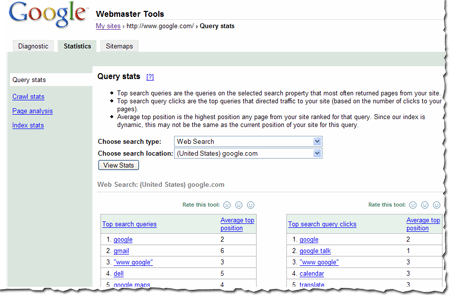
If you've checked your site's query stats lately, you may have noticed that they're changing more often than they used to. This is because we recently changed how frequently we calculate them. Previously, we showed data that was averaged over a period of three weeks. Now, we show data that is averaged over a period of one week. This results in fresher stats for you, as well as stats that more accurately reflect the current queries that return your site in the results. We update these stats every week, so if you'd like to keep a history of the top queries for your site week by week, you can simply download the data each week. We generally update this data each Monday.
How we calculate query stats
Some of you have asked how we calculate query stats.
These results are based on results that searchers see. For instance, say a search for [Britney Spears] brings up your site as position 21, which is on the third page of the results. And say 1000 people searched for [Britney Spears] during the course of a week (in reality, a few more people than that search for her name, but just go with me for this example). 600 of those people only looked at the first page of results and the other 400 browsed to at least the third page. That means that your site was seen by 400 searchers. Even though your site was at position 21 for all 1000 searchers, only 400 are counted for purposes of this calculation.
Both top search queries and top search query clicks are based on the total number of searches for each query. The stats we show are based on the queries that most often return your site in the results. For instance, going back to that familiar [Britney Spears] query -- 400 searchers saw your site in the results. Now, maybe your site isn't really about Britney Spears -- it's more about Buffy the Vampire Slayer. And say Google received 50 queries for [Buffy the Vampire Slayer] in the same week, and your site was returned in the results at position 2. So, all 50 searchers saw your site in the results. In this example, Britney Spears would show as a top search query above Buffy the Vampire Slayer (because your site was seen by 400 searchers for Britney but 50 searchers for Buffy).
The same is true of top search query clicks. If 100 of the Britney-seekers clicked on your site in the search results and all 50 of the Buffy-searchers click on your site in the search results, Britney would show as a top search query above Buffy.
At times, this may cause some of the query stats we show you to seem unusual. If your site is returned for a very high-traffic query, then even if a low percentage of searchers click on your site for that query, the total number of searchers who click on your site may still be higher for the query than for queries for which a much higher percentage of searchers click on your site in the results.
The average top position for top search queries is the position of the page on your site that ranks most highly for the query. The average top position for top search query clicks is the position of the page on your site that searchers clicked on (even if a different page ranked more highly for the query). We show you the average position for this top page across all data centers over the course of the week.
A variety of download options are available. You can:
- download individual tables of data by clicking the Download this table link.
- download stats for all subfolders on your site (for all search types and locations) by clicking the Download all query stats for this site (including subfolders) link.
- download all stats (including query stats) for all verified sites in your account by choosing Tools from the My Sites page, then choosing Download data for all sites and then Download statistics for all sites.


0 comments:
Post a Comment